dockerized OpenJSCAD
-
To answer https://stackoverflow.com/q/54959351/1497139 I tried dockerizing OpenJSCAD.
The idea was to show how comparable to https://www.openjscad.org/examples/ you could setup your own "workspace" and make it available via a Docker Volume. That way the include commands should work much easier than with the drag & drop solution that mostly seems not to work with recent browser versions of Chrome & Firefox i tested.
I started https://github.com/BITPlan/docker-openjscad inspired by
https://github.com/LarsModig/openjscad-dockerI get OpenJSCAD to succesfully run locally on port 8080 on my computer this way but if I try:
http://localhost:8080/examples i get:404 not found: /examples/
http://localhost:8080/index.html#examples/globe.jscad
works.Now I am going to try to make some kind of "workspace" available. Unfortunately something like
http://localhost:8080/index.html#workspace/Box.jscaddoes for some reason not work although
http://localhost:8080/workspace/Box.jscaddoes supply the required file.
See https://stackoverflow.com/a/55198689/1497139 for the state of affairs.
What am i missing here? -
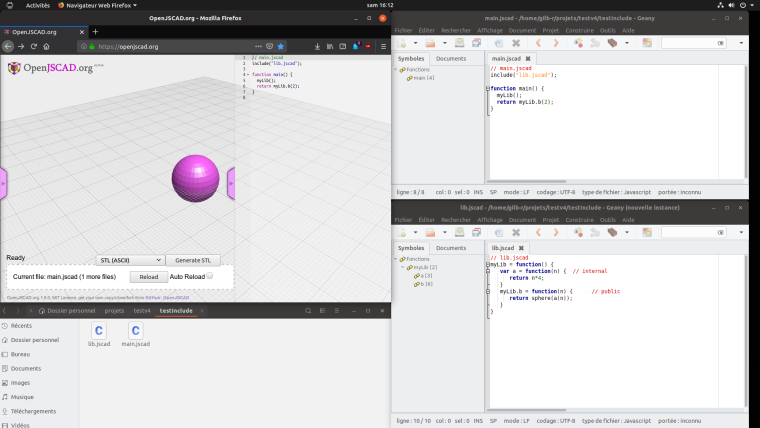
To make the exemple from the wiki work, there are a few changes to make to main.jscad
- the include file name must be the same as the lib name
- the call to b function from myLib must not contain parenthesis
- a call to the library must be done at the beginning of main (I call this instanciation but it might be something else).
-
Thanks for trying to explain this. I do not understand this.
"The include file name must be the same as the lib name"
What is a lib name and how is it specified?
"the call to b function from myLib must not contain parenthesis"
So it seems as if there are some assumptions on how includes have to behave to be "includeable" .
In this case the include would not be an "include" that includes the text of another file but some other mechanism that needs explanation.How does this mechanism work?
"a call to the library must be done at the beginning of main (I call this instanciation but it might be something else)."
Again there is some "library" assumption. A true include would include anything not just predefined libraries. So the naming "include" seems to be misleading again and needs more explanation.
What is a library that can be included?
The main issue seems to be that when the include fails no proper error message appears. If something is included that exists but the mechanism fails it would be helpful if one could see what's going on.
-
Sorry, I was not clear enough,
- The first point is only that the file name into the include must be the same as the file name containing the library (in the wiki example, there was vol-au-vent.jscad into and lib.jscad.
- I have no idea how this mechanism work (I'm only a jscad user not a core developer) but I only know that without this call the content of the lib (the higher level function function of the file) is not available.
- The syntax seems to be important (it's called anonymous function, it's not executed immediately but when called upon later) to make code a library.
I'm using this mechanism for a long time now and it works.
-
Thanks for the swift reply. I think we are getting closer.
I gave up with the "sister-directory" approach and put the workspace below the examples directory.This way
docker run --publish=8080:8080 --name openjscad -v /Users/wf/source/docker/docker-openjscad/workspace:/openjscad/packages/web/examples/workspace bitplan/openjscad:latest
works and mounts my workspace directory to the docker container. I have added a sample workspace now to https://github.com/BITPlan/docker-openjscad/tree/master/workspace
http://localhost:8080/index.html#examples/workspace/Cube.jscad
now leads to the error:ReferenceError: Box is not defined
which is a pity since it would be exactly my expectation for an include command to really include another source as if it would be part of the source that I am editing.
For the "official" example from the wiki i have fixed the include statement (both in the wiki as well as in the dockerization github workspace).
I also tried to follow your hint of adding a myLib() call. The result is:
TypeError: myLib(...) is undefined
So I think we only need one of your working examples and we'd be all set to improve the documentation and file a few issues / change requests.
The general principle works with the docker approach and probably also if you include OpenJSCAD in a local browser installation.
-
My example is here :
https://github.com/gilboonet/designs/tree/master/testInclude
You can test it by drag&drop the directory to openjscad.org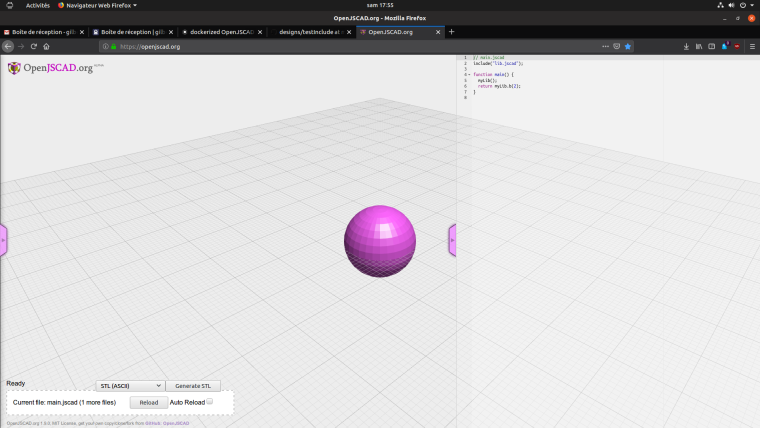
-
There was only a very small difference ...
diff main.jscad /Users/wf/source/scad/testinclude/main.jscad 6c6
<   return myLib().b(2);
---
>   return myLib.b(2);
I 'v fixed the dockerized github repo and will try to fix the wiki now, too.
Thanks for all the help finally I am going to work on my own designs now ...


Hello! It looks like you're interested in this conversation, but you don't have an account yet.
Getting fed up of having to scroll through the same posts each visit? When you register for an account, you'll always come back to exactly where you were before, and choose to be notified of new replies (either via email, or push notification). You'll also be able to save bookmarks and upvote posts to show your appreciation to other community members.
With your input, this post could be even better 💗
Register Login