Auto-reload and external editor workflows
-
@rich-27 Welcome!
It seems that you hit the bug as mentioned here.
https://github.com/jscad/OpenJSCAD.org/issues/765
There’s an issue with Lerna on Windows. Luckily, there’s a work around mentioned at the end of the issue.
-
Hi Rich, hot off the presses, I just created a tool called jscad-now:
https://github.com/danmarshall/jscad-nowI hit all the same problems you reported, and so I created this tool. It seems to work for me and I hope it does for you too. Let me know what you think.
-
@z3dev Ah awesome, thanks, that was just the ticket - it builds and runs and autoreload works just fine!
Is that the general workflow people go for then, building the web version and running locally? I'm still pretty unclear on whether you need a separate tool for jscad.xyz autoreload to work or not. If you could shed some light on autoreload or how you write jscad projects I'd really appreciate it!
Thanks for all your hard work with developing JSCAD and being active in threads like this, it's a really awesome program and makes programmatic CAD so much more workable and appealing than OpenSCAD; just knowing there are really useful bits of functionality like the measurement package and that if some functionality I'd like is missing I can easily write an extension method is fantastic even if I'm not using them yet (I've found it quite a pain with Fusion 360, OpenSCAD, Tinkercad, etc. to put a large amount of effort into a model to later find the program has some major limitation).
This is what I've put together so far, and it's been so smooth doing so!:
https://jscad.xyz/#https://gist.githubusercontent.com/rich-27/a88a9b0a376911645442611a4fa1875c/raw/a3c258518aed6faedc06aacdeb29f913bb4e0e17/atxConnectorGenerator.js
https://jscad.xyz/#https://gist.githubusercontent.com/rich-27/9d1d3e67fa76e588a7e2237c5c084a1a/raw/dd389aada03993a2eb6c5e799c10a5c8b017ffb7/diceChargingStation_flattened.js -
@danmarshall Oh wow, that is so cool! Yeah, it works fantastically well - with the headache that was experimenting with extensions and trying to figure out js build tools and live reload, I'm blown away by how it was just two commands and it works, straight away, no configuration needed. Top work!
-
Hi,
kudos for the atx connector generator, pretty nice one
I am using windows 10 and chrome. Auto-reload on jscad.xyz works just fine for me.
Bu it only works for me if I drag and drop the jscad file on the button, but not if I click the button and chose the file.
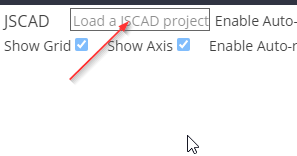
I have used livereload for many years now and I use the one from npm:
https://www.npmjs.com/package/livereload
It may not have been developed for years but it just works.livereload is actually not required, but it helps to reload changes faster (notice changes faster)
without livereload jscad has to scan project files/files periodically which can become slow...
I have also converted from OpenSCAD when I discovered openjscad. -
@hrgdavor Thanks! I had fun making it, I put it together as part learning exercise, part component of a stupidly overkill solution for laying out and making my own PSU cables.
Interesting; I tried both chrome and firefox with both drag and drop and button (I tried directories and individual files), and until I installed LiveReload the webpage would not reflect changes, even with waiting for quite a while.
Good to know there's an npm package for livereload, I'm not used to using npm and wouldn't have thought to check. Thanks for the info!
-
@rich-27 Browser glitches are pain to investigate and fix.
I am not a dev here, but I am curious.
Could you just for sake of more info test your "dice charging station" in chrome incognito(without plugins or ad blockers)
make sure "Enable Auto-reload" is checked and then use drag and drop to load the project file.
-
@rich-27 thanks for the continuous feedback.
I’ll double check the reload feature again. Basically, this feature is all about compatibility with standards, which browsers sometimes fail. Firefox is a good example.
Quick question, are you using the latest and greatest versions?
-
@z3dev Yep, Firefox Developer Edition 87.0b2 and freshly downloaded Chrome
-
@hrgdavor I've just tested Chrome incognito, Firefox private, and a new regular old Firefox tab and all are working perfectly today. I'm not sure if I was doing something differently before, but I'm not able to replicate the problem at all, sorry. For reference, Chrome was completely clean (freshly downloaded with no plugins) each time, and Firefox is working with my standard setup of uBlock Origin and Privacy Badger extensions
-
@rich-27 thanks for the feedback
... it is nice see more people join the community. Have fun and create more cool stuff




Hello! It looks like you're interested in this conversation, but you don't have an account yet.
Getting fed up of having to scroll through the same posts each visit? When you register for an account, you'll always come back to exactly where you were before, and choose to be notified of new replies (either via email, or push notification). You'll also be able to save bookmarks and upvote posts to show your appreciation to other community members.
With your input, this post could be even better 💗
Register Login