Use jscad in vue

-
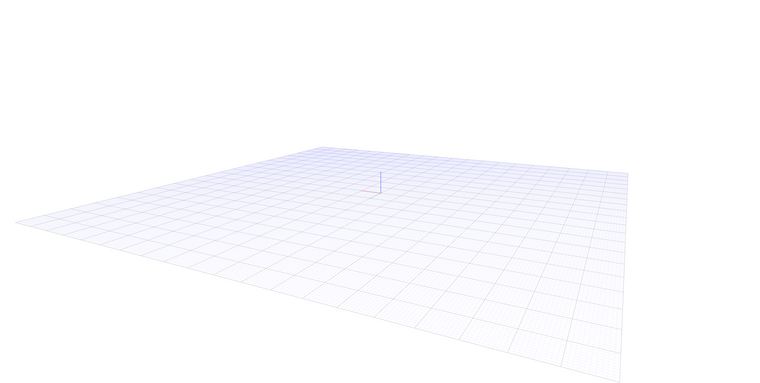
@z3dev I want to develop a web system that displays CAD models based on jscad and can adjust the models through simple parameter configuration. The scene code is converted to vue, the scene can be displayed normally, but how to add the model to the scene smoothly? I can't find related content in jscad-web.
-
@jess-yan Welcome!
The WEB UI is based on a different reactive framework called 'most'. I would not recommend using this.
You might be interested in the small VUE components that I created to show how to use JSCAD within the VUE framework.
https://github.com/z3dev/vue-components
It's still in progress so let me know if you have any issues.
-
@z3dev Thank you for your help, good news! I successfully built a model display system using vue+JSCAD. It can directly display .dxf files. But I was frustrated to find that my system cannot display 2D graphics.
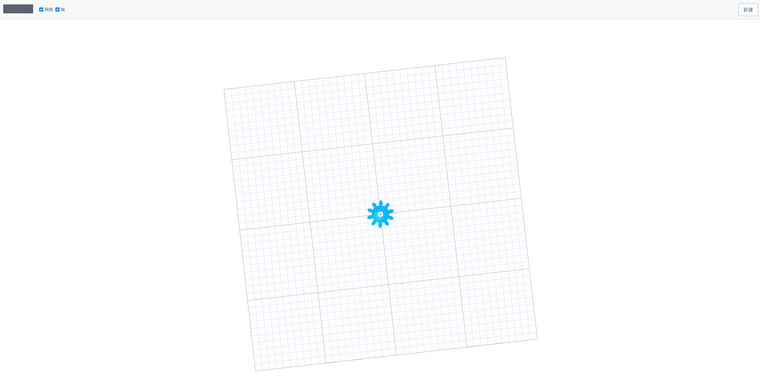
When did I have a problem because the system has no abnormal information. 2D files can also be successfully compiled, that is, there is no display on the canvas.
My key is to be consistent with the key code in vue-components. I didn't use vue-components directly, and I can also key code on the basis of vue.export default { name: 'cad-viewer', props: { solids: { type: Array, }, grid: { type: Object, }, axis: { type: Object, }, cameraPosition: { type: Array, default: () => [150, -180, 233], }, }, data() { return { render: () => {}, updateView: true, rotateDelta: [0, 0], panDelta: [0, 0], zoomDelta: 0, zoom2Fit: false, // state to track mouse mouse: { buttons: 0, shiftKey: false, isOrbiting: false, lastClick: 0, // ms lastZoom: 0, }, controls: orbitControls.defaults, camera: { ...perspectiveCamera.defaults, position: this.cameraPosition, }, } }, computed: { gridOptions() { const { show = false, color = [0, 0, 0, 1], subColor = [0, 0, 1, 0.5], fadeOut = false, transparent = false, size = [200, 200], ticks = [50, 5], } = this.grid return { visuals: { drawCmd: 'drawGrid', show, color, subColor, fadeOut, transparent, }, size, ticks, } }, axisOptions() { const { show = true } = this.axis return { visuals: { drawCmd: 'drawAxis', show, }, } }, content() { return { // define the visual content camera: this.camera, drawCommands: { drawGrid: drawCommands.drawGrid, drawAxis: drawCommands.drawAxis, drawMesh: drawCommands.drawMesh, }, entities: [this.gridOptions, this.axisOptions, ...this.solids], } }, }, watch: { solids() { this.updateView = true }, grid() { this.updateView = true }, cameraPosition(position) { this.camera.position = position this.updateView = true }, }, created() { numberOfInstances++ this.id = numberOfInstances }, mounted() { this.initializeRenderer() }, methods: { initializeRenderer() { this.$el.id = `viewer${this.id}` const width = this.$el.clientWidth const height = this.$el.clientHeight perspectiveCamera.setProjection(this.camera, this.camera, { width, height, }) perspectiveCamera.update(this.camera, this.camera) // prepare the renderer const setupOptions = { glOptions: { container: this.$el }, } this.renderer = prepareRender(setupOptions) window.addEventListener('resize', () => { this.updateView = true }) // 告诉浏览器希望执行一次动画,并在下次重绘制前执行回调函数 window.requestAnimationFrame(this.updateAndRender) }, updateAndRender() { // 处理相机和轨道 this.doRotatePanZoom() if (this.updateView) { const updates = orbitControls.update({ controls: this.controls, camera: this.camera, }) this.controls = { ...this.controls, ...updates.controls } this.updateView = this.controls.changed this.camera.position = updates.camera.position perspectiveCamera.update(this.camera) this.resize() const { content } = this // TODO 这里的处理不知道是否合适 content.entities = content.entities .reduce((pre, cur) => { if (!cur.visuals) { pre.push(...entitiesFromSolids({}, cur)) } pre.push(cur) return pre }, []) .filter((item) => item.visuals) this.renderer(content) } window.requestAnimationFrame(this.updateAndRender) }, doRotatePanZoom() { let { rotateDelta, panDelta, zoomDelta, zoom2Fit, controls, camera, content, } = this // 旋转增量存在 if (rotateDelta[0] || rotateDelta[1]) { const updated = orbitControls.rotate( { controls, camera, speed: rotateSpeed }, rotateDelta ) this.controls = { ...controls, ...updated.controls } this.rotateDelta = [0, 0] this.updateView = true } // 平移增量存在 if (panDelta[0] || panDelta[1]) { const updated = orbitControls.pan( { controls, camera, speed: panSpeed }, panDelta ) this.camera.position = updated.camera.position this.camera.target = updated.camera.target this.panDelta = [0, 0] this.updateView = true } // 缩放增量存在 if (zoomDelta) { const updated = orbitControls.zoom( { controls, camera, speed: zoomSpeed }, zoomDelta ) this.controls = { ...controls, ...updated.controls } this.zoomDelta = 0 this.updateView = true } // 缩放到合适比例 if (zoom2Fit) { // 缩放到缩放比为2 controls.zoomToFit.tightness = 2 const updated = orbitControls.zoomToFit({ controls, camera, entities: content.entities.filter((entity) => entity.geometry), }) this.controls = { ...controls, ...updated.controls } this.zoom2Fit = false this.updateView = true } }, resize() { // 像素比例 const pixelRatio = window.devicePixelRatio || 1 // 获取元素大小和相对于视口位置 const bounds = this.$el.getBoundingClientRect() // 计算元素边界尺寸 const width = (bounds.right - bounds.left) * pixelRatio const height = (bounds.bottom - bounds.top) * pixelRatio // 获取元素真实尺寸 const prevWidth = this.$el.width const prevHeight = this.$el.height // 如果尺寸发生变化 if (prevWidth !== width || prevHeight !== height) { // 更新元素的尺寸 this.$el.width = width this.$el.height = height // 设置相机投影 perspectiveCamera.setProjection(this.camera, this.camera, { width, height, }) // 更新相机 perspectiveCamera.update(this.camera, this.camera) this.updateView = true } }, // mouse event handling onMouseDown(event) { const { mouse } = this mouse.buttons = event.buttons mouse.shiftKey = event.shiftKey mouse.isOrbiting = true }, onMouseUp() { const now = Date.now() const { mouse } = this if (mouse.lastClick) { const ms = now - mouse.lastClick if (ms < doubleClickSpeed) { if (mouse.isOrbiting) { this.zoom2Fit = true } } } mouse.lastClick = now mouse.buttons = 0 mouse.shiftKey = false mouse.isOrbiting = false }, onMouseMove(event) { const { mouse, panDelta, rotateDelta } = this if (mouse.isOrbiting) { if (mouse.shiftKey) { panDelta[0] -= event.movementX panDelta[1] += event.movementY } else { rotateDelta[0] += event.movementX rotateDelta[1] -= event.movementY } } }, onScroll(event) { event.preventDefault() this.zoomDelta = event.deltaY }, }, } -
@z3dev said in Use jscad in vue:
@jess-yan Welcome!
The WEB UI is based on a different reactive framework called 'most'. I would not recommend using this.
You might be interested in the small VUE components that I created to show how to use JSCAD within the VUE framework.
https://github.com/z3dev/vue-components
It's still in progress so let me know if you have any issues.
For vue-components, I removed vuex related content, which I think is cleaner and easier to use.
-
@jess-yan you found a bug!
 i'll patch today, and let you know when the new version is available.
 -
@jess-yan Here's the fix...
diff --git a/src/viewerComponent.js b/src/viewerComponent.js index 95b9321..f5bbbdd 100644 --- a/src/viewerComponent.js +++ b/src/viewerComponent.js @@ -77,6 +77,7 @@ const setupRenderer = (containerElement, data) => { drawCommands: { drawGrid: drawCommands.drawGrid, drawAxis: drawCommands.drawAxis, + drawLines: drawCommands.drawLines, drawMesh: drawCommands.drawMesh }, -
@z3dev OK! Can now display 2D!!!
-
@jess-yan Super! Please let us know when a working website is available. There are many of us that want to extend JSCAD in various ways.


Hello! It looks like you're interested in this conversation, but you don't have an account yet.
Getting fed up of having to scroll through the same posts each visit? When you register for an account, you'll always come back to exactly where you were before, and choose to be notified of new replies (either via email, or push notification). You'll also be able to save bookmarks and upvote posts to show your appreciation to other community members.
With your input, this post could be even better 💗
Register Login