Help me understand the structure of a project.
-
I have installed the offline version on a Ubuntu 20 machine and can run examples, but find I am not clear how to organise my files and create shared libraries. Do the all have to be within
/usr/local/lib/node_modules/@jscad ?
How would I re-locate to a user area /~paul/development/jscad... for example?Any help welcome.
-
@paul-a-golder welcome!
A project is comprised of a folder that contains ALL the pieces of the design. You can place the project anywhere, and drag-n-drop the folder to the JSCAD window.
However, due to security issues, browsers cannot not access files outside the folder. You wouldn't want hackers to access all your files.

JSCAD V1 projects are limited as the 'include' directive is kind of strange. There are some projects in the examples, and you can look at those for some pointers.
Let us know if you want some other examples.
-
Here's one trick...
You can use soft links to add sub-projects to a project folder.
-
Thanks for the reply.
I am trying the drag-n-drop folder approach with a simple two file example.
====
file one - test.jscadinclude ("./tube.js"); function main() { var atube = tube(100,32,30); return atube; }======
========
file two tube.js ( or tube.jscad)function main(params) { var atube = tube(params.length,params.outerdiameter,params.innerdiameter); return atube; } function getParameterDefinitions() { return [ { name: 'outerdiameter', caption: 'Outer Diameter:', type: 'float', default: 10 }, { name: 'innerdiameter', caption: 'Inner Diameter:', type: 'float', default: 8 }, { name: 'length', caption: 'length:', type: 'float', default: 20 }, ]; } function tube(len, od,id) { var ocylinder = CSG.cylinder({ start: [0, -len/2, 0], end: [0, +len/2, 0], radius: od/2, resolution: 40 // optional }); var icylinder = CSG.cylinder({ start: [0, -len/2, 0], end: [0, +len/2, 0], radius: id/2, resolution: 40 // optional }); var cylinder = ocylinder.subtract(icylinder); return cylinder; }============
These are both in the same directory in my user area. I dragged the directory to the OpenJSCAD.org interface and the result is :
ReferenceError: tube is not defined
Line: 124,col: 0
(blob:https://openjscad.org/d80c6540-7a94-4c8f-b319-51dc761194f2 line 43 > Function)
I am anyway puzzled as to how the interpreter knows which file is the Main one to execute.
I have tried with Firefox 79 for Ubuntu and Chromium Version 84.0.4147.105 (Official Build) Built on Ubuntu , running on Ubuntu 18.04 (64-bit) with the included file both as .js and as .jscad
-
@paul-a-golder Hello, here is how I do to use library.
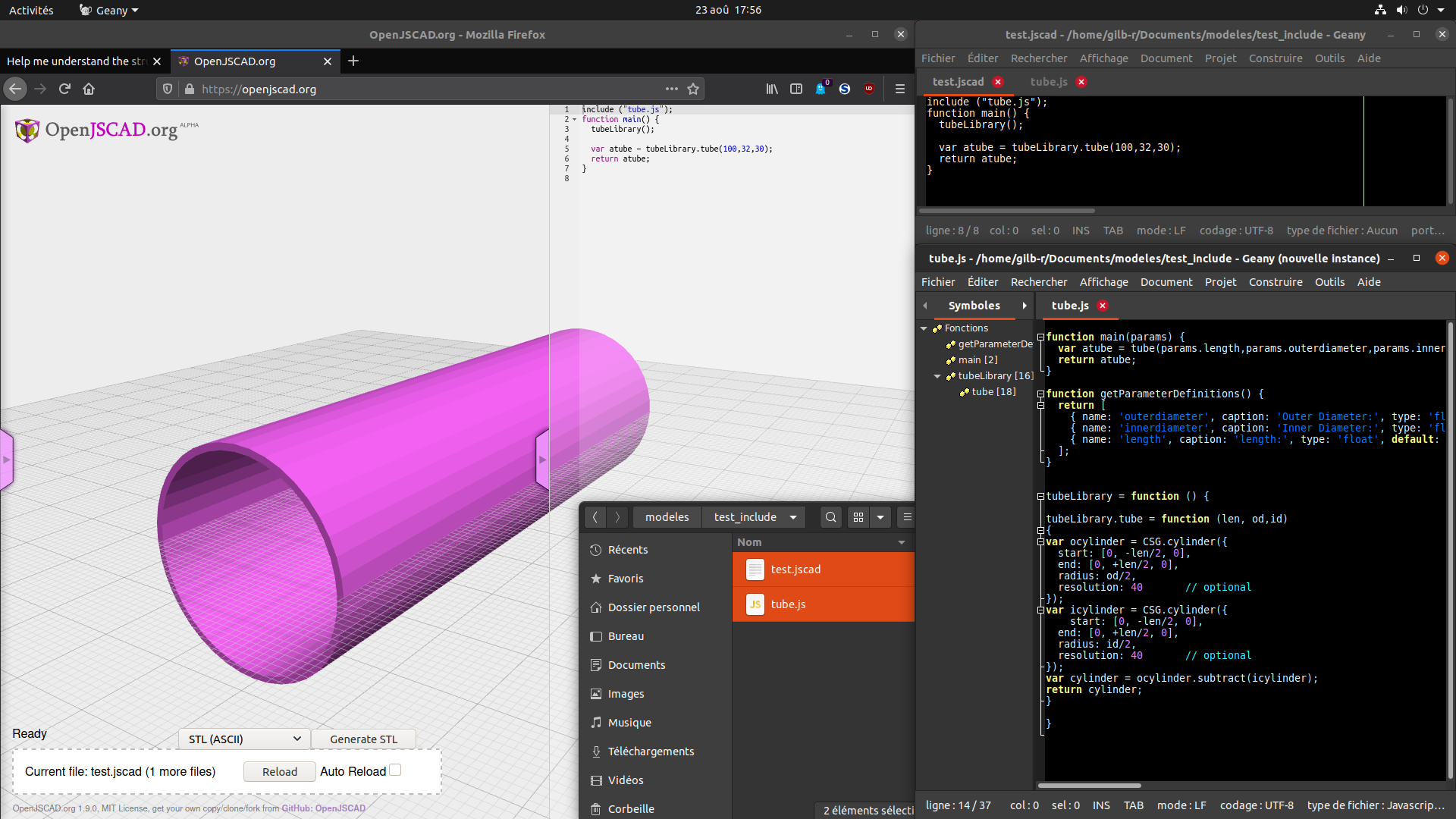
- It only works when dragging the two files to jscad, not the folder (for this case).
- The library must be contained into a function (here tubeLibrary), and the function (here tube) must be inside this function, and its name must be preceded by the library name and "." so it can be use outside the library
- the included library must be called before its functions can be use (tubeLibrary() )
(note that I didn't change tube.js main to use tube(), only test.jscad)
I hope this could help you.
-
@paul-a-golder said in Help me understand the structure of a project.:
I am anyway puzzled as to how the interpreter knows which file is the Main one to execute.
Very simple in V1... there must be one file with the name main.js / main.jscad
-
@gilboonet Thanks very much for the example I think I can see my way forward. I like the integration with Geany, another thing for me to try, currently I use Kate
-
@gilboonet I ran into a simple problem, the selection order of the downloaded files matters. I was not getting the same result as you as my files had different names and in my file selector appear in the reverse order. When I made the file selector do a reverse ordering of filenames and then completed the drag and drop I achieved the same result as you. Thanks again.
-
@paul-a-golder It may be because you have 2 files having a main function, the latter replacing the first one.
-
@paul-a-golder said in Help me understand the structure of a project.:
Thanks for the reply.
I am trying the drag-n-drop folder approach with a simple two file example.
====
file one - test.jscadinclude ("./tube.js"); function main() { var atube = tube(100,32,30); return atube; }======
========
file two tube.js ( or tube.jscad)function main(params) { var atube = tube(params.length,params.outerdiameter,params.innerdiameter); return atube; } function getParameterDefinitions() { return [ { name: 'outerdiameter', caption: 'Outer Diameter:', type: 'float', default: 10 }, { name: 'innerdiameter', caption: 'Inner Diameter:', type: 'float', default: 8 }, { name: 'length', caption: 'length:', type: 'float', default: 20 }, ]; } function tube(len, od,id) { var ocylinder = CSG.cylinder({ start: [0, -len/2, 0], end: [0, +len/2, 0], radius: od/2, resolution: 40 // optional }); var icylinder = CSG.cylinder({ start: [0, -len/2, 0], end: [0, +len/2, 0], radius: id/2, resolution: 40 // optional }); var cylinder = ocylinder.subtract(icylinder); return cylinder; }============
These are both in the same directory in my user area. I dragged the directory to the OpenJSCAD.org interface and the result is :
ReferenceError: tube is not defined
Line: 124,col: 0
(blob:https://openjscad.org/d80c6540-7a94-4c8f-b319-51dc761194f2 line 43 > Function)
I am anyway puzzled as to how the interpreter knows which file is the Main one to execute.
I have tried with Firefox 79 for Ubuntu and Chromium Version 84.0.4147.105 (Official Build) Built on Ubuntu , running on Ubuntu 18.04 (64-bit) with the included file both as .js and as .jscad
What would the equivalent of this look like with V2? I've had great luck using the npm modules but I'm embarrassed to say that I still haven't understood the project structure for V2.
-
@BarbourSmith a very good question.
In V2, the best approach is to make a project folder. And then organize the parts as desired, including sub-directories.
project/
- index.js // this file is the entry point, and exports main
- tube.js
- subassembly/
  - index.js
By the way, if the project works with the CLI, then the same project should work with the WEB UI as well.




Hello! It looks like you're interested in this conversation, but you don't have an account yet.
Getting fed up of having to scroll through the same posts each visit? When you register for an account, you'll always come back to exactly where you were before, and choose to be notified of new replies (either via email, or push notification). You'll also be able to save bookmarks and upvote posts to show your appreciation to other community members.
With your input, this post could be even better 💗
Register Login