proxyUrl setting
-
Hi
I am now trying to include openjscad interface on our website.
The modeling scripts are ready, and works well, but I am not able to mount the script file directly on the page likehttps://YOURSITE/?uri=http://www.thingiverse.com/download:164128
or
https://YOURSITE/#http://www.thingiverse.com/download:164128
the readme in the github says that
use and path of the proxy can be set by:
• changing the proxyUrl value in src/ui/index.js
• since this is hardcoded , if you do not use the provided dev server, rebuild your main file (See Contributing)but there is no file such as src/ui/index.js
by default installation.Is there something wrong with my installation?
or any suggestion to set the proxyUrl, and so on
I would like to know the needed process to enable the remote file loading.I am working on:
https://fablab-shinagawa.org/jscad/packages/web/index.htmlone of the modeling script is:
https://fablab-shinagawa.org/jscad/designs/fruitsHolder.jsThank you
-
@hamade welcome
FYI, you are the first person trying this, i.e. installing the full website.
This is going to take some extra steps because there's some setup for the website, as well as special files for making the website function properly.
Are you sure that a 100% copy of the JSCAD website is necessary?
-
@z3dev
Thank you for your reply.
Actually, I do not need a 100% copy of the JSCAD website.
Just want to include JSCAD interface to existing website.
Instead of former question, I have been working on following URL, just with the necessary script :
https://fablab-shinagawa.org/jscad/In this page, I edited the script temporary so that we are able to manipulate our modeling sources via help menu.
Anyway, I would like to know the process to activate using those URLs such as :
https://fablab-shinagawa.org/jscad/index.html#https://fablab-shinagawa.org/jscad/designs/fruitsHolder.js
without errors.Thank you.
Founder of FabLab Shinagawa
Director of hamanakadesignstudio LLC. -
@hamade if you setup proper "Access-Control-Allow-Origin" header on your server when downloading https://fablab-shinagawa.org/jscad/designs/fruitsHolder.js you would be able to do it without proxy by direct fetch from js
this url would work then for my proto that has no proxy
https://3d.hrg.hr/jscad/three/threejscad2.html?uri=https://fablab-shinagawa.org/jscad/designs/fruitsHolder.jsfor exampe if I put your script to gihtub as a gist it works
https://3d.hrg.hr/jscad/three/threejscad2.html?uri=https://gist.githubusercontent.com/hrgdavor/08e61d2014ed7b62078fa9106380f634/raw/815d639e16bfa4e88e65e2e50b6772bc17cab35a/fruit.js -
@hamade OK. Here's where to start...
The webserver must support PERL, as there's a PERL script that runs on the webserver. (I can assist if you are using Apache)
After configuring and testing the webserver, copy 'remote.pl' to the webserver, and move into the base directory of the jscad website.
We use...
/var/www/openjscad.xyz/public_html/remote.pl
In addition, a new directory needs to be created called 'cache'. The PERL script downloads files and puts the file into this directory.
-
@hamade Those designs are not accessible.
https://www.fablab-shinagawa.org/designs/petbottleOpener.js
That URL needs to work, i.e. the file should download and show in the browser.
So, the webserver configuration is incorrect.
Here's an example...
-
@z3dev
Thank you for your reply.
My rental server supports PERL.
I placed "remote.pl" file, and made "cache" folder in the same directory of "index.html". What is the permission setting of "cache" folder ?The URL you showed as not accessible, has to be :
https://www.fablab-shinagawa.org/jscad/designs/petbottleOpener.js
Modeling scripts has no problem.
Please check this link :
https://openjscad.xyz/#https://www.fablab-shinagawa.org/jscad/designs/petbottleOpener.jsAnd I always have following error, when I put the link like :
https://www.fablab-shinagawa.org/jscad/packages/web/index.html#https://www.fablab-shinagawa.org/jscad/designs/petbottleOpener.jsERROR:
Unexpected token # in JSON at position 0
Stack: SyntaxError: Unexpected token # in JSON at position 0 -
@hrgdavor
Thank you for your reply.
I think, it might be caused not by CORS matter.
Because when I am accessing from the same server, there still shows error message like this (Accessed URL: https://www.fablab-shinagawa.org/jscad/packages/web/index.html#https://fablab-shinagawa.org/jscad/designs/canHolder.js) :ERROR:
Unexpected token # in JSON at position 0
Stack: SyntaxError: Unexpected token # in JSON at position 0 -
please check browser network tab(it can be seen there why you get syntax error):
also in network tab you can see the url that is called and if you open it in a diffferent tab:
https://www.fablab-shinagawa.org/jscad/packages/web/remote.pl?url=https://fablab-shinagawa.org/jscad/designs/canHolder.jsit looks like your perl script is not executed. You need to cofigure web server to run it instead treating as static asset

-
@hrgdavor
Thank you for your reply.
I suppose there is no error showed in console.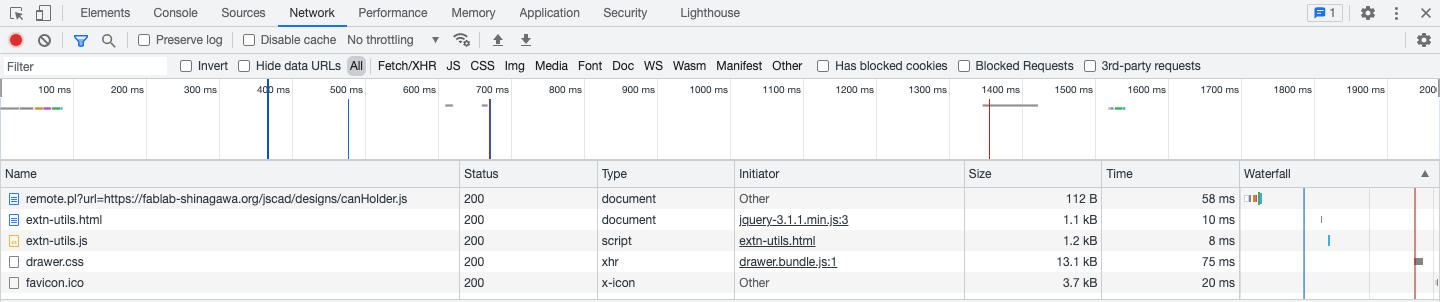
The console says that :
DevTools failed to load source map: Could not parse content for https://www.fablab-shinagawa.org/jscad/packages/web/drawer.css.map: Unexpected token < in JSON at position 0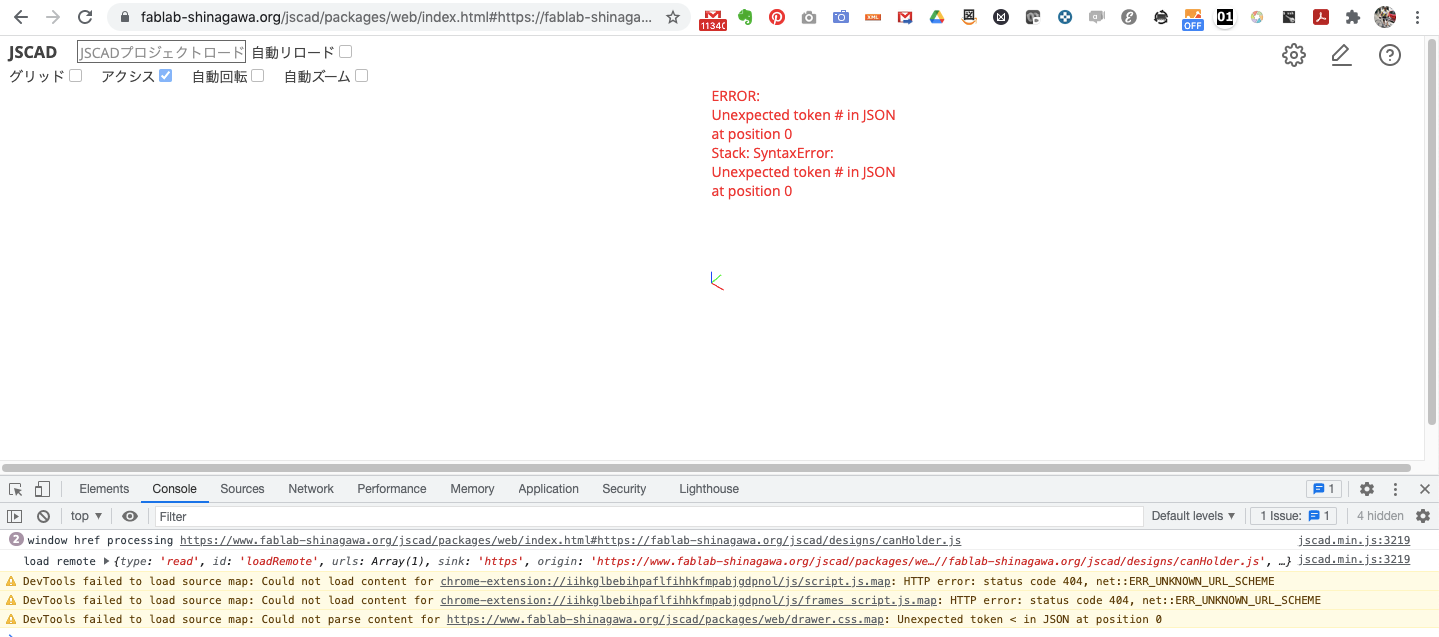
-
@hamade the error is exactly right
you have given an url that is not a script, it fails on syntax parsing.
and if you take a look into network tab you will see why
you need to fix your proxy script and web server config so it returns js file that you expect instead of perl source of your proxy script.
-
-
@hamade Can you provide some feedback on the installation?
What webserver are you using?
Did you make any special changes to the configuration of the webserver?
Did you have any issues installing the web site? Make any changes?
-
@z3dev
I am using a rental server of general settings, nothing special, I think.
I did no configuration of the web server.
I did not changed anything on setting when installing the web site.Thanks to all of you related,
I have uploaded the page.
https://www.fablab-shinagawa.org/archive/index.html
when you click "パラメトリック" - which means "parametric"- tab,
you would see the list of our parametric designs, and again when you click a design,
you would link to the page includes openjscad model.


Hello! It looks like you're interested in this conversation, but you don't have an account yet.
Getting fed up of having to scroll through the same posts each visit? When you register for an account, you'll always come back to exactly where you were before, and choose to be notified of new replies (either via email, or push notification). You'll also be able to save bookmarks and upvote posts to show your appreciation to other community members.
With your input, this post could be even better 💗
Register Login