How do you single step your code?
-
I just started using the JSCAD web version. As my files get bigger I would like to use the debugger and set breakpoints.
When I open the inspector, I can see my file Under https://jscad.app/{unique id}
but I can not set a breakpoint.
I would rather not pepper my file with console.log statements.
How do you single step your code?
David Bolt
David.Bolt@SFCknox.org -
@david-bolt this is kind of tricky right now, but @z3dev just merged a pull request which will make it much easier, soon.
The problem is that chrome has a different set of break points for the Main Thread vs Web Workers. If you set a breakpoint on the main sources, it won't pause the debugger if that line of code is executed on a Web Worker. Which is a problem since JSCAD runs modeling in a worker.
You could set the breakpoint in the worker sources. But the problem is that on the currently published version of JSCAD, it loads a NEW worker for each render. Which resets the breakpoints.
@z3dev literally just merged a commit to master that retains the web worker, and I just tested locally, and it DOES enable you to step through:
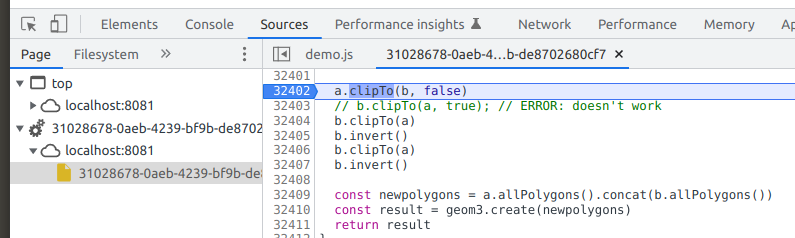
So your options are:
- run locally and add
console.logstatements - run locally and add
debuggerstatements - run locally latest version from master, and add breakpoints to Web Worker Sources
- wait for the next version to be cut (usually at least monthly), and then do (3) on the jscad website.
- run locally and add
-
Actually, you can just put a
debuggerstatement in your design, chrome will pause at it, and then you can step through it. Neat. -
@David-Bolt The latest release has a change which retains the webworker thread. So, debugging should be easier now.



Hello! It looks like you're interested in this conversation, but you don't have an account yet.
Getting fed up of having to scroll through the same posts each visit? When you register for an account, you'll always come back to exactly where you were before, and choose to be notified of new replies (either via email, or push notification). You'll also be able to save bookmarks and upvote posts to show your appreciation to other community members.
With your input, this post could be even better 💗
Register Login