How to use vec2/3 classes
-
Hello, as I restarted using JSCAD, after a long time using only C language, then vanilla JS, I would like to know how to use the vec2/3 classes, what is the needed require, and how to use them. I remember I used such classes with V1 but with V2 I didn't and for exemple I have code where I need to compute a geometry dimensions and center, so I use
b = measureBoundingBox()
then the dimensions are b[1] minus b[0]
and the center is b[1] minus dimensions' half
For the moment I'm directly using the values from the returned array. -
Just to reply to my own question ...
const jscad = require('@jscad/modeling')
const { sphere } = jscad.primitives
const { vec3 } = jscad.maths
const { translate } = jscad.transforms

const main = () => {
  let A = vec3.fromValues(15,0,5);
  console.log("A:", A);

  let B = vec3.create();

  vec3.add(B, A, [50,0,0]);

  console.log("B:", B);

  let C = vec3.create();
  vec3.add(C, A, B);
  vec3.divide(C, C, [2,2,2]);

  return [
    translate(A, sphere({radius:2}))
    ,
    translate(B, sphere({radius:2}))
    ,
    translate(C, sphere({radius:1}))
  ];
}

module.exports = { main }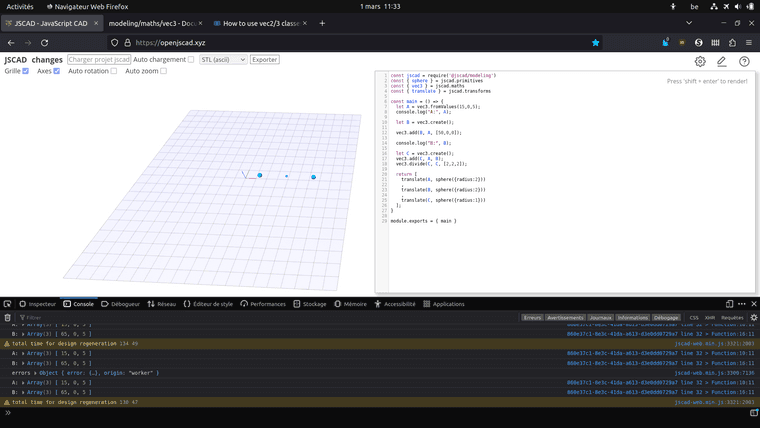
-
@gilboonet the example looks fine. You can create, rotate, transform all the math objects..
Now comes the fun part... curves, distances, etc. There are little tidbits of logic throughout the library. You can find some of the basic calculations in the primitives, I.e. arc, circle, sphere, etc.
And of course, let us know if you have questions.


Hello! It looks like you're interested in this conversation, but you don't have an account yet.
Getting fed up of having to scroll through the same posts each visit? When you register for an account, you'll always come back to exactly where you were before, and choose to be notified of new replies (either via email, or push notification). You'll also be able to save bookmarks and upvote posts to show your appreciation to other community members.
With your input, this post could be even better 💗
Register Login