export colored model to .obj
-
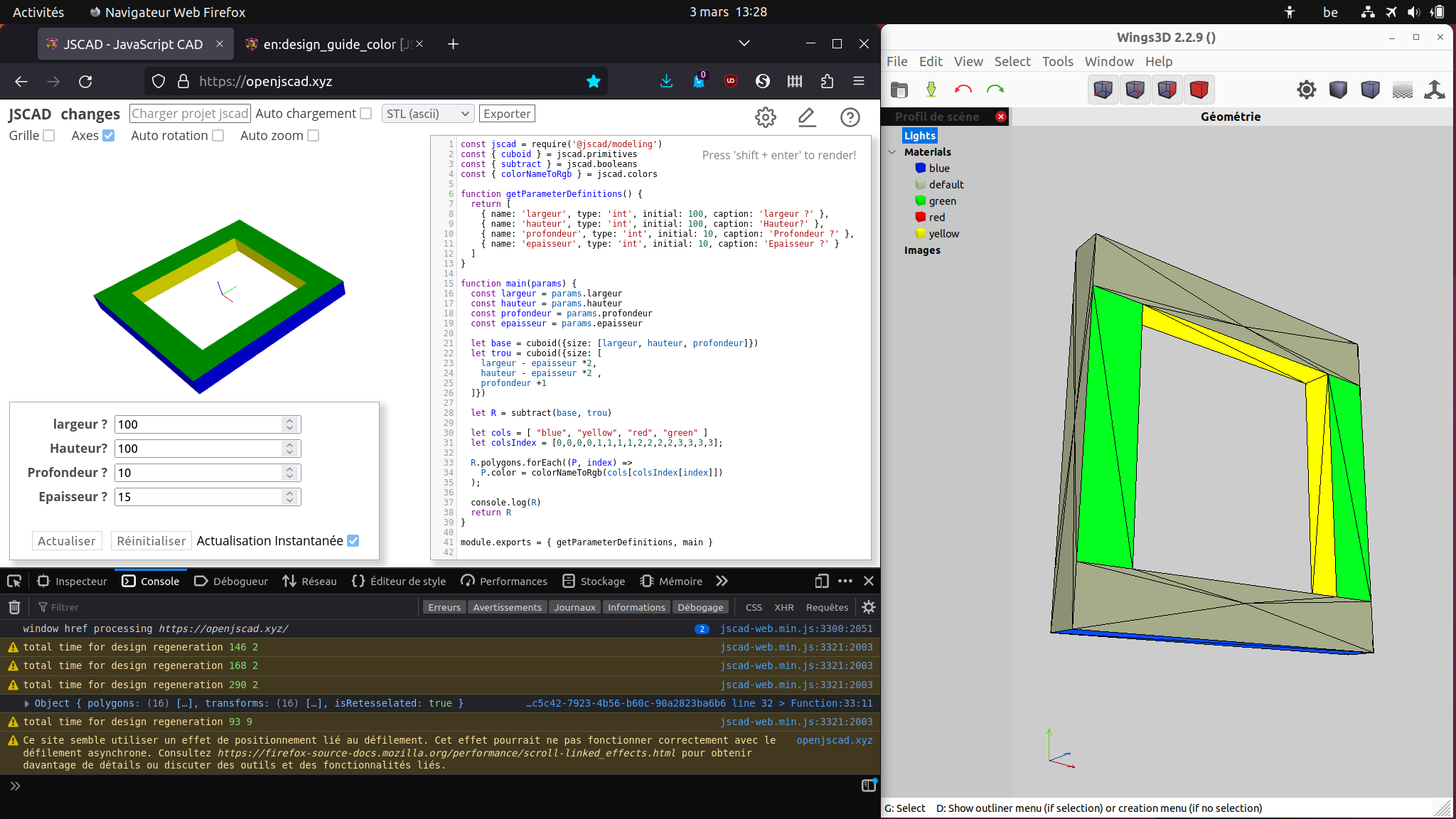
Hello, I'm making a script that generates a custom rectangular frame, that part is basic and works as intended. But I added colors to each of its parts (polygons). 10 of them that are simple sets of 2 triangles are OK and are colored, but 6 of them that are more complex sets of 6 triangles are not and have default color (I mean when I import the .obj into Wings 3d). Am I missing something ?
here is my code
const jscad = require('@jscad/modeling')
const { cuboid } = jscad.primitives
const { subtract } = jscad.booleans
const { colorNameToRgb } = jscad.colors

function getParameterDefinitions() {
  return [
    { name: 'largeur', type: 'int', initial: 100, caption: 'largeur ?' },
    { name: 'hauteur', type: 'int', initial: 100, caption: 'Hauteur?' },
    { name: 'profondeur', type: 'int', initial: 10, caption: 'Profondeur ?' },
    { name: 'epaisseur', type: 'int', initial: 10, caption: 'Epaisseur ?' }
  ]
}

function main(params) {
  const largeur = params.largeur
  const hauteur = params.hauteur
  const profondeur = params.profondeur
  const epaisseur = params.epaisseur

  let base = cuboid({size: [largeur, hauteur, profondeur]})
  let trou = cuboid({size: [
    largeur - epaisseur *2,
    hauteur - epaisseur *2 ,
    profondeur +1
  ]})

  let R = subtract(base, trou)

  let cols = [ "blue", "yellow", "red", "green" ]
  let colsIndex = [0,0,0,0,1,1,1,1,2,2,2,2,3,3,3,3];

  R.polygons.forEach((P, index) =>
    P.color = colorNameToRgb(cols[colsIndex[index]])
  );

  console.log(R)
  return R
}

module.exports = { getParameterDefinitions, main }
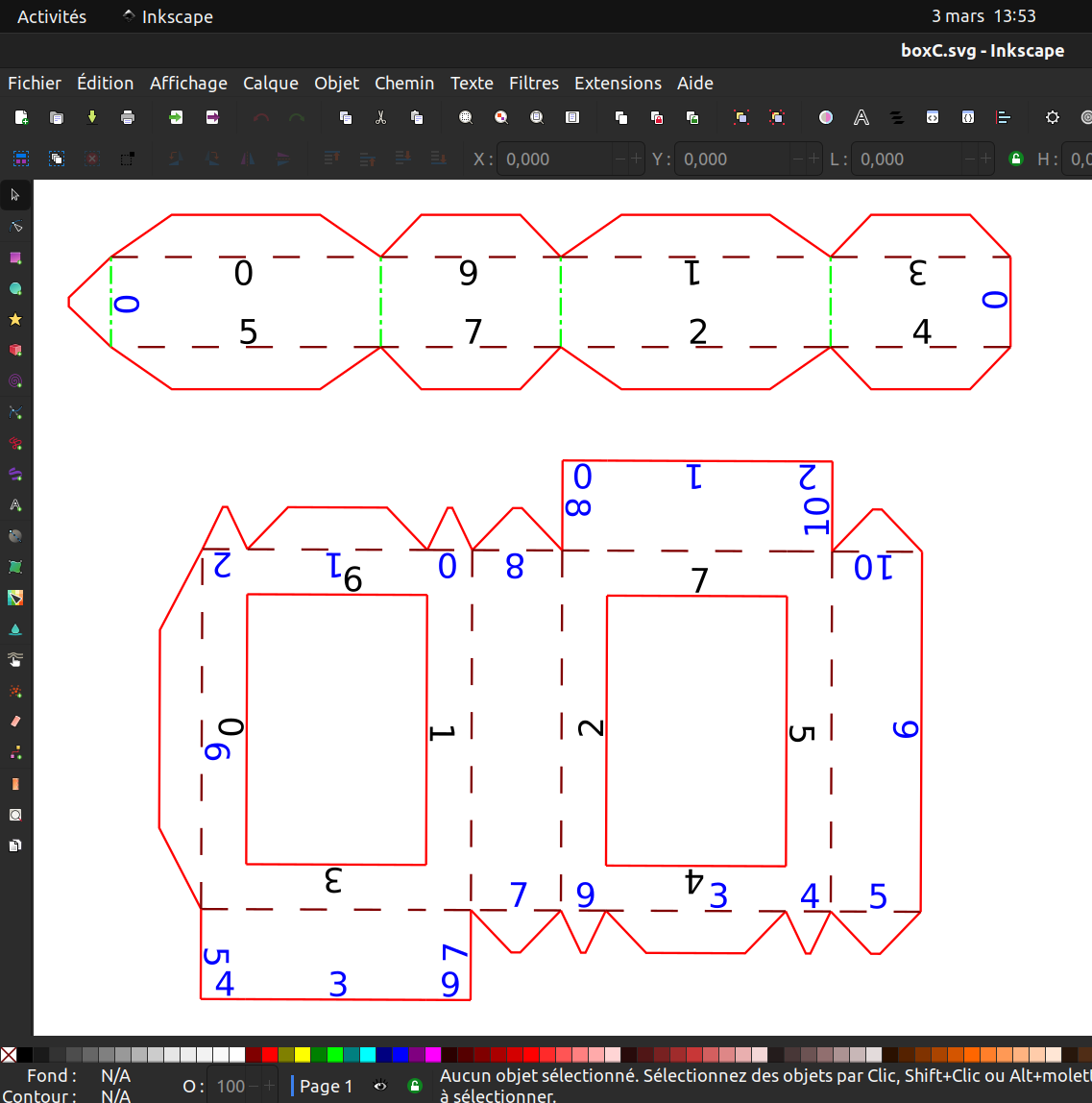
I'm coloring faces to have distincts pieces when building the 2d pattern, like this one
-
For facets coloring like that, it would be very useful to be able to see the faces number on mouse hover.
-
@gilboonet the issue is likely that export calls generalize that then calls retessellate. these function try to fix the polygons if there are some fixable errors and also cobine multiple triangles that are coplanar into a single polygon. At that point the color info is lost as those colored triangles are replaced by a new polygon.
-
@hrgdavor Thank you, I can try to rewrite it without using boolean operation to see it the resulting polygons keep their colors.
-
Here is another version of the script that correctly produces the colored .obj file.
const jscad = require('@jscad/modeling')
const { polygon } = jscad.primitives
const { union } = jscad.booleans
const { extrudeLinear } = jscad.extrusions
const { colorNameToRgb } = jscad.colors

function getParameterDefinitions() {
  return [
    { name: 'larg', type: 'int', initial: 100, caption: 'largeur ?' },
    { name: 'haut', type: 'int', initial: 100, caption: 'Hauteur?' },
    { name: 'prof', type: 'int', initial: 10, caption: 'Profondeur ?' },
    { name: 'ep', type: 'int', initial: 10, caption: 'Epaisseur ?' }
  ]
}

const main = (params) => {
  let larg = params.larg
  let haut = params.haut
  let prof = params.prof
  let ep = params.ep

  let pExt = []
  let x = larg/2
  let y = haut/2
  pExt.push ([x, y])
  pExt.push ([x, -y])
  pExt.push ([-x, -y])
  pExt.push ([-x, y])

  let pInt = []
  x = larg/2 - ep
  y = haut/2 - ep
  pInt.push ([x, y])
  pInt.push ([x, -y])
  pInt.push ([-x, -y])
  pInt.push ([-x, y])

  let R = []

  for (let i = 0; i < 4; i++) {
    let i2 = i < 3 ? i+1 : 0
    R.push(polygon({points: [pExt[i], pInt[i], pInt[i2], pExt[i2]]}));
  }

  let C2d = union(R)

  let C3d = extrudeLinear({height: prof}, C2d)

  console.log(C3d)

  const cols = [ "blue", "yellow", "red", "green" ]

  let pc = new Array(32)
  pc.fill(0,0,16)
  pc.fill(1,0,2)
  pc.fill(1,4,6)
  pc.fill(1,8,10)
  pc.fill(1,12,14)

  pc.fill(2,16,24)
  pc.fill(3,24,32)

  C3d.polygons.forEach((P, index) => P.color = colorNameToRgb(cols[pc[index]]))

  return C3d

}

module.exports = { getParameterDefinitions, main }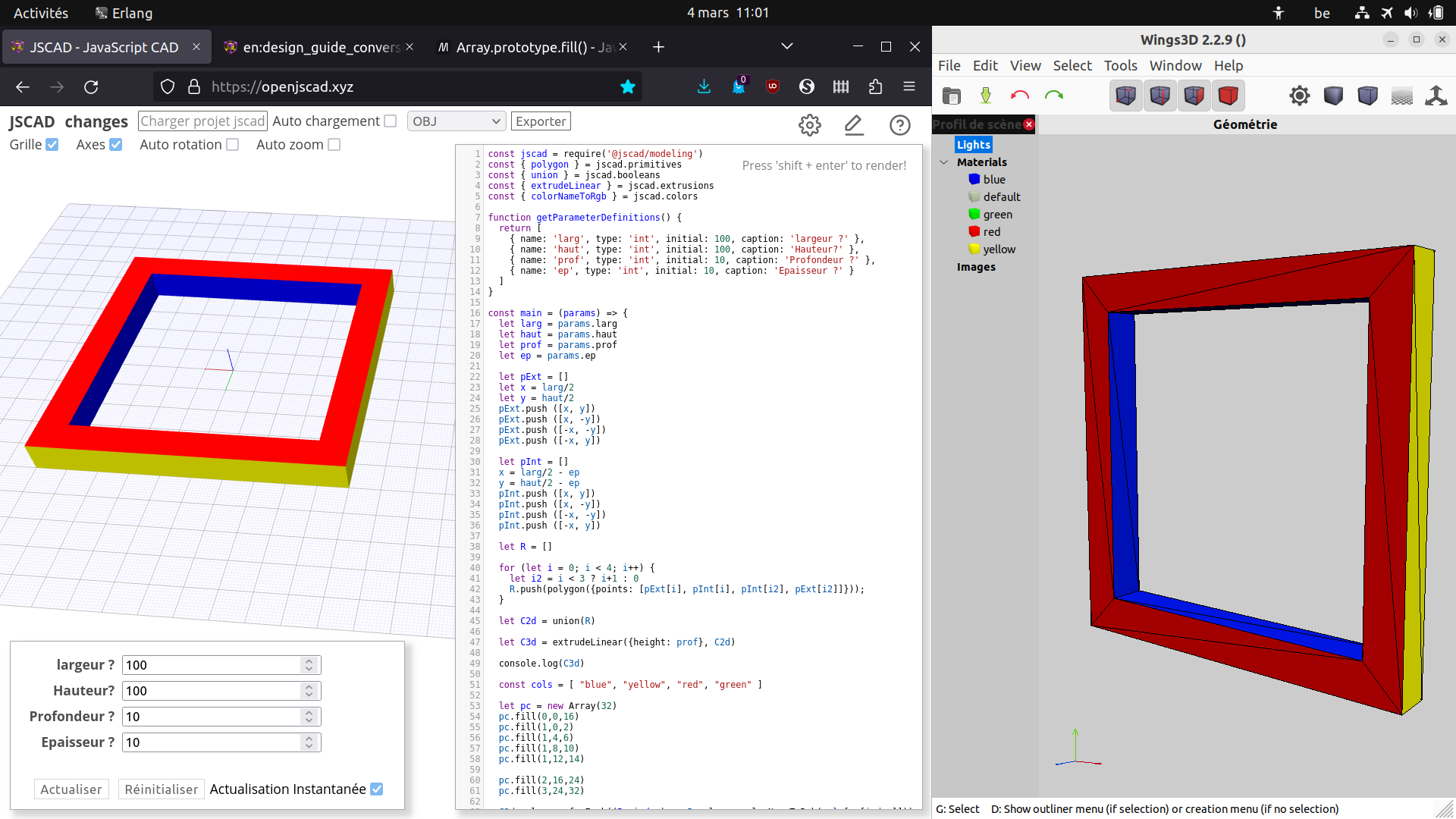
The coloring code could be improved, instead of manual inputs I could test polygons values.
-
@gilboonet vool
 . Nice to see it working


Hello! It looks like you're interested in this conversation, but you don't have an account yet.
Getting fed up of having to scroll through the same posts each visit? When you register for an account, you'll always come back to exactly where you were before, and choose to be notified of new replies (either via email, or push notification). You'll also be able to save bookmarks and upvote posts to show your appreciation to other community members.
With your input, this post could be even better 💗
Register Login