JSCAD User Group
    • Tags
    • Popular
    • Users
    • Groups
    • Register
    • Login
    1. Home
    2. Popular
    Log in to post
    • All Time
    • Day
    • Week
    • Month
    • All Topics
    • New Topics
    • Watched Topics
    • Unreplied Topics

    • All categories
    • H

      Problem with the website

      Watching Ignoring Scheduled Pinned Locked Moved General Discussions
      5
      0 Votes
      5 Posts
      959 Views
      hrgdavorH
      @Honest-Guvnor It is fine to ask both here and on discord.
    • jess yanJ

      How to select the rendered model with the mouse?

      Watching Ignoring Scheduled Pinned Locked Moved Development Discussions
      5
      0 Votes
      5 Posts
      1k Views
      hrgdavorH
      @z3dev @jess-yan yup. it is not implemented right now. But such feature has a lot more to consider to be implemented. It may be beneficial to start a discussion on git to see what would be expectation of such functionality and what it would take to implement it.
    • Gorka ArakisG

      From .obj to .dxf

      Watching Ignoring Scheduled Pinned Locked Moved General Discussions
      5
      0 Votes
      5 Posts
      964 Views
      Gorka ArakisG
      @z3dev Happy to hear it!
    • hrgdavorH

      ScriptCAD.org

      Watching Ignoring Scheduled Pinned Locked Moved General Discussions
      5
      0 Votes
      5 Posts
      1k Views
      hrgdavorH
      @jess-yan threejs has this ready-made somewhere(taking mouse point and returning meshes under it), I will most definitely post it on the forum here when I have this feature. This MAY require a shift away from how jscad works now, but hopefuly can be done with current jscad setup. The idea I have for now is to run a AST transform to inject line number information into the script and then run the modified script. This is something I am able to do, but I have other stuff in the pipeline before this
    • C

      REST API or automatic loading from script

      Watching Ignoring Scheduled Pinned Locked Moved General Discussions
      5
      0 Votes
      5 Posts
      2k Views
      z3devZ
      @cncandi It looks like you made a copy of the JSCAD website. That's really customize to support drag-n-drop, loading projects, URL options, etc. It's probably not what you really want. Take a look at the websites and frameworks mentioned here. https://openjscad.xyz/dokuwiki/doku.php?id=en:user_guide_help Let us know if you have any more questions.
    • Sea-DH1S

      About @jscad/core

      Watching Ignoring Scheduled Pinned Locked Moved General Discussions
      5
      0 Votes
      5 Posts
      1k Views
      Sea-DH1S
      @z3dev I see that it has the function of dragging and dropping stl loading
    • Mark HahnM

      debug jscode cli with vscode

      Watching Ignoring Scheduled Pinned Locked Moved General Discussions
      5
      0 Votes
      5 Posts
      1k Views
      z3devZ
      @mark-hahn super thanks! There’s still a little wizardry going on here. But I’ll try this with VSCODE, and then ask a few more questions.
    • gilboonetG

      how to create a multicolor polyhedron ?

      Watching Ignoring Scheduled Pinned Locked Moved Design Discussions
      5
      1
      0 Votes
      5 Posts
      1k Views
      gilboonetG
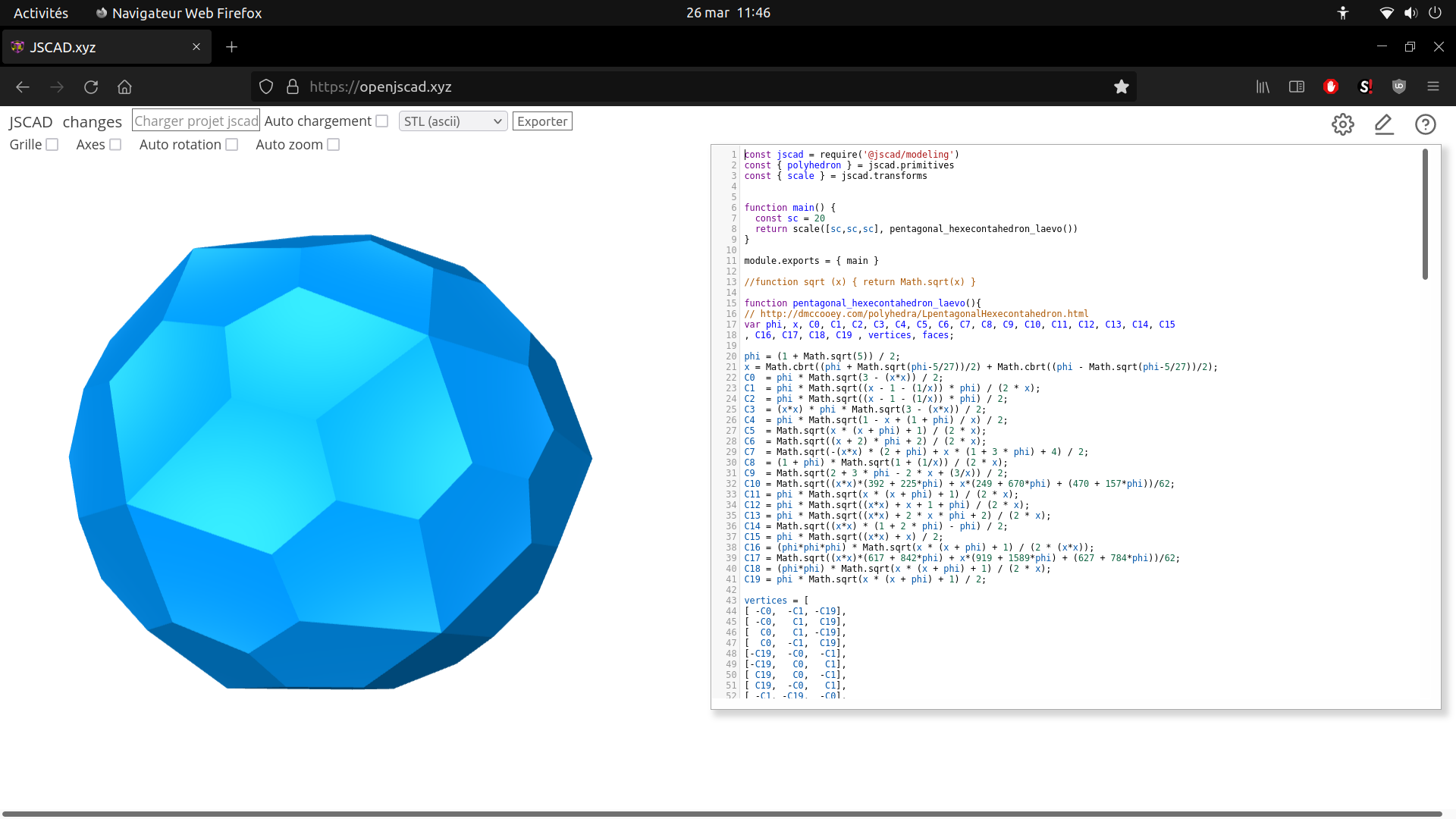
      I changed my obj importer code to make it work with obj without groups. Now I can start to colorize my models by code. And there's one nice thing about that : I can use that faces coloring to store a volume's unfold pattern. [image: 1648412375738-capture-d-%C3%A9cran-de-2022-03-26-21-48-08.png]
    • David BoltD

      Can not get View type: Orthographic to work.

      Watching Ignoring Scheduled Pinned Locked Moved Development Discussions
      5
      0 Votes
      5 Posts
      2k Views
      Ion 0I
      @david-bolt one suggestion from what i've tried could be to set the camera position for regular perspective camera further away as an orthographic camera is just a perspective camera at infinity
    • Jason SprouseJ

      AI in JSCAD for Generative AI

      Watching Ignoring Scheduled Pinned Locked Moved General Discussions
      5
      0 Votes
      5 Posts
      2k Views
      z3devZ
      @Jason-Sprouse Love the idea! There are lots of reasons to use AI, and most are for research or learning purposes. You might want to start with some examples. Such as "show me how to use JSCAD circles?" Or even more complex examples.
    • Hermann-SWH

      Can "openjscad.xyz/?uri=..." support "data" protocol in addition to "http(s)"?

      Watching Ignoring Scheduled Pinned Locked Moved Design Discussions
      5
      0 Votes
      5 Posts
      2k Views
      Hermann-SWH
      @hrgdavor Thanks, done: https://github.com/jscad/OpenJSCAD.org/issues/1318
    • her01nH

      quadcopter frame implemented in jscad

      Watching Ignoring Scheduled Pinned Locked Moved General Discussions
      5
      0 Votes
      5 Posts
      6k Views
      her01nH
      @z3dev I have been using openscad, but i have found it very limiting. Most code is manually converted from openscad - that was suprisingly fast to do. I don't have any plans with the project, its just for fun.
    • hpb-htwH

      Old version of rollup

      Watching Ignoring Scheduled Pinned Locked Moved General Discussions
      5
      0 Votes
      5 Posts
      2k Views
      z3devZ
      @hpb-htw Super! You understand well. Each package will have a slightly different version, as Lerna determines major/minor/fix versions by changes. The main package is never released so, the version stays the same, but should be 3.0.0. Please take another look at utils/regl-renderer package. The demo html files are slightly different in V3.
    • sopattS

      applyTransforms

      Watching Ignoring Scheduled Pinned Locked Moved Design Discussions
      5
      0 Votes
      5 Posts
      2k Views
      sopattS
      @z3dev if there is anything I can do to help, I'm willing. I'm happy to share my code as well. Here is PosableGeom3.js: "use strict"; const jscad = require('@jscad/modeling'); const { Pose } = require('./Pose'); const { mat4, vec3, vec4 } = jscad.maths; const { geom3 } = jscad.geometries; const { PI } = Math; // Base class for geom3 objects with named Poses class PosableGeom3 { constructor(geometry, poses) { this._geometry = geometry || geom3.create(); this._poses = {}; if (poses) { Object.keys(poses).forEach(key => { this._poses[key] = poses[key].clone(); }); } } get polygons() { return this._geometry.polygons; } set polygons() { this._geometry.polygons = value; } get transforms() { return this._geometry.transforms; } set transforms(value) { this._geometry.transforms = value; } clone() { // Create a new geom3 with deep-copied polygons and transforms const clonedGeom = geom3.clone(this._geometry); // Clone the poses const clonedPoses = {}; Object.keys(this._poses).forEach(key => { clonedPoses[key] = this._poses[key].clone(); }); // Create a new PosableGeom3 with the cloned geometry and poses return new PosableGeom3(clonedGeom, clonedPoses); } transform(matrix) { this._geometry = geom3.transform(matrix, this._geometry); Object.keys(this._poses).forEach(key => { this._poses[key].transform(matrix); }); return this; } getPose(name) { return this._poses[name] || new Pose(); } applyTransforms(){ this._geometry = geom3.create(geom3.toPolygons(this._geometry)); return this; } alignTo(port, targetPose) { const sourcePose = this.getPose(port); if (!sourcePose) { throw new Error(`Invalid port ${port}`); } if (!targetPose) { throw new Error(`Invalid targetPose`); } return this.transform( sourcePose.getMatrix(targetPose) ); } } module.exports = { PosableGeom3 }; And here is Pose.js: "use strict"; const jscad = require('@jscad/modeling'); const { vec3, vec4, mat4 } = jscad.maths; const { geom3 } = jscad.geometries; const { abs } = Math; const { translate } = jscad.transforms; const { union } = jscad.booleans; const { cylinder, sphere, cylinderElliptic } = jscad.primitives; const x = 0; const y = 1; const z = 2; const w = 3; class Pose { constructor(point, heading, up) { // Default position to origin if not provided this._point = point ? vec3.clone(point) : vec3.create(); // Default heading to Y+ (0, 1, 0) if not provided this._heading = vec3.normalize( vec3.create(), heading ? vec3.clone(heading) : [0, 1, 0] ); // Default up to Z+ (0, 0, 1) if not provided this._up = up ? vec3.clone(up) : [0, 0, 1]; // Project up onto the plane perpendicular to heading const dot = vec3.dot(this._up, this._heading); const projectedUp = vec3.subtract( vec3.create(), this._up, vec3.scale(vec3.create(), this._heading, dot) ); // Check if up is parallel to heading // (length of projectedUp near zero) if (vec3.length(projectedUp) < 0.00001) { // Choose a perpendicular vector based on heading if (abs(this._heading[z]) < 0.99999) { this._up = vec3.cross( vec3.create(), this._heading, [0, 0, 1] ); } else { this._up = vec3.cross( vec3.create(), this._heading, [1, 0, 0] ); } } else { this._up = vec3.normalize(vec3.create(), projectedUp); } // Ensure up is normalized vec3.normalize(this._up, this._up); } get point() { return vec3.clone(this._point); } get heading() { return vec3.clone(this._heading); } get up() { return vec3.clone(this._up); } clone() { return new Pose(this._point, this._heading, this._up); } transform(matrix) { // Transform point (w = 1) let v = this._point.concat(1); // Convert vec3 to vec4 v = vec4.transform(vec4.create(), v, matrix); this._point = vec3.clone(v); // Convert back to vec3 // Transform heading (w = 0) v = this._heading.concat(0); // Convert vec3 to vec4 v = vec4.transform(vec4.create(), v, matrix); this._heading = vec3.clone(v); // Convert back to vec3 // Transform up (w = 0) v = this._up.concat(0); // Convert vec3 to vec4 v = vec4.transform(vec4.create(), v, matrix); this._up = vec3.clone(v); // Convert back to vec3 return this; } getMatrix(targetPose) { let t = mat4.create(); // Step 1: Translate to origin t = mat4.multiply( mat4.create(), mat4.fromTranslation(mat4.create(), vec3.scale(vec3.create(), this._point, -1)), t ); // Step 2: Align heading with targetPose t = mat4.multiply( mat4.create(), mat4.fromVectorRotation(mat4.create(), this._heading, targetPose._heading), t ); // Step 3: Roll around heading to align up vector const p = this.clone().transform(t); const dot = vec3.dot( vec3.cross(vec3.create(), p._up, targetPose._up), p._heading ); let angle = vec3.angle(p._up, targetPose._up); if (dot < 0) angle = -angle; if (Math.abs(angle) > 1e-6) { t = mat4.multiply( mat4.create(), mat4.fromRotation(mat4.create(), angle, targetPose._heading), t ); } // Step 4: Translate to targetPose.point t = mat4.multiply( mat4.create(), mat4.fromTranslation(mat4.create(), targetPose._point), t ); return t; } render() { const vecGeom = (vector) => { const vectorLength = vec3.length(vector) || 1;; const vectorRadius = vectorLength / 10; const arrowLength = vectorLength / 5; const arrowRadius = vectorLength / 5; let out = union( cylinder({ // arrow body center: [0, 0, vectorLength / 2], height: vectorLength, radius: vectorRadius }), cylinderElliptic({ // arrow head center: [0, 0, vectorLength], startRadius: [arrowRadius, arrowRadius], endRadius: [0, 0], height: arrowLength }) ); out = geom3.transform( mat4.fromVectorRotation( mat4.create(), [0, 0, vectorLength], vector ), out ); return out; }; let g = translate( this._point, union( sphere({ radius: 0.2 }), vecGeom(this._heading), vecGeom(this._up) ) ); return g; } roll(angle) { if (angle === 0) return this; // Create a rotation matrix around the heading vector const rotationMatrix = mat4.create(); mat4.rotate( rotationMatrix, rotationMatrix, angle, this._heading ); // Transform the up vector using the rotation matrix (w = 0) const transformedUp = vec4.transform( vec4.create(), this._up.concat(0), rotationMatrix ); this._up = vec3.clone(transformedUp); return this; } translate(vector) { this._point = vec3.add( vec3.create(), vector, this._point ); } } module.exports = { Pose }; // end of file

    • JamesNewtonJ

      google+ data?

      Watching Ignoring Scheduled Pinned Locked Moved General Discussions
      4
      0 Votes
      4 Posts
      4k Views
      z3devZ
      OK. I archived what I could down load using the crappy tools from Google. I’m pretty peaved at the results. Obviously, Google thinks that a bunch of monkeys can write software to download web content. SIGH
    • z3devZ

      V2 cylinders

      Watching Ignoring Scheduled Pinned Locked Moved Development Discussions
      4
      0 Votes
      4 Posts
      3k Views
      kaosat-devK
      @torejorg that is a very good point that we did not consider like that, but perhaps instead of having it as a parameter for cylinders we could (emphasis on "could") have a 'skew' operation (like translate & co), or even just leverage the transform (transformation by a 4x4 matrix) to achieve a similar result ? I am not aware of how limiting/acceptable that would be to be honest [image: matrix14.png]
    • Viktor HedefalkV

      Vanilla js/npm in browser?

      Watching Ignoring Scheduled Pinned Locked Moved General Discussions
      4
      0 Votes
      4 Posts
      2k Views
      Viktor HedefalkV
      @viktor-hedefalk said in Vanilla js/npm in browser?: Or does it resolve those at upload time? Gonna test that… No, it can't do that? That would be the worst security thing ever on a browser to allow… Just watched the tutorial series to the end of part 4 - and the cliffhanger for part 5: https://youtu.be/hnLLNmP_mzA?t=646 "In the next part we will get to how you can split up your design into multiple files…"
    • LinGuanfuL

      how to run demo in V2/web?

      Watching Ignoring Scheduled Pinned Locked Moved Development Discussions
      4
      2
      0 Votes
      4 Posts
      2k Views
      z3devZ
      @tektio V2 JSCAD is very different then V1 JSCAD. The old examples are no longer usable with V2 JSCAD. Probably the best way to enabled two viewers would be through the use of the VUE components, but you'll have to write some HTML / JavaScript. https://github.com/z3dev/vue-components
    • SimonClarkS

      All parameters being ignored in local install.

      Watching Ignoring Scheduled Pinned Locked Moved Development Discussions
      4
      0 Votes
      4 Posts
      1k Views
      SimonClarkS
      thanks @z3dev. I made some bad assumptions about what docs were relevant
    • irevdevI

      Just introducing myself 👋

      Watching Ignoring Scheduled Pinned Locked Moved General Discussions
      4
      0 Votes
      4 Posts
      893 Views
      z3devZ
      @irevdev welcome! the README files for the packages will provide some information on installation and initial use. See packages/cli, packages/web, packages/desktop the currently available application (www.openjscad.org) is on the master branch. and there is major development on V2 branch. we are asking for people to become 'early adopters' if interested in V2. there's been some good progress lately with the creation of the initial v2 packages. more to come in the next few weeks.